
-
July 16, 2026
Operational Excellence: How BPM Drives Continuous Improvement
Learn more

BPM platform selection guide: Evaluation criteria framework, vendor comparison table, total cost of ownership calculator, questions to ask vendors, red flags to avoid, and step-by-step selection process. Make the right choice for your organisation.

Choosing a BPM platform is one of the most consequential technology decisions your organisation will make. Get it right, and you enable years of process improvement, efficiency gains, and operational excellence. Get it wrong, and you're stuck with expensive software that doesn't meet your needs, frustrated users, and a costly migration ahead.
The challenge? The BPM market is crowded. Every vendor claims to offer the same capabilities: workflow automation, low-code development, integration, analytics. Marketing materials blur together. Demos showcase best-case scenarios.
This guide cuts through the noise. We'll explore the decision criteria that actually matter, the questions vendors won't volunteer answers to, and the red flags that indicate a platform won't deliver what you need.
Understanding What You're Really Buying
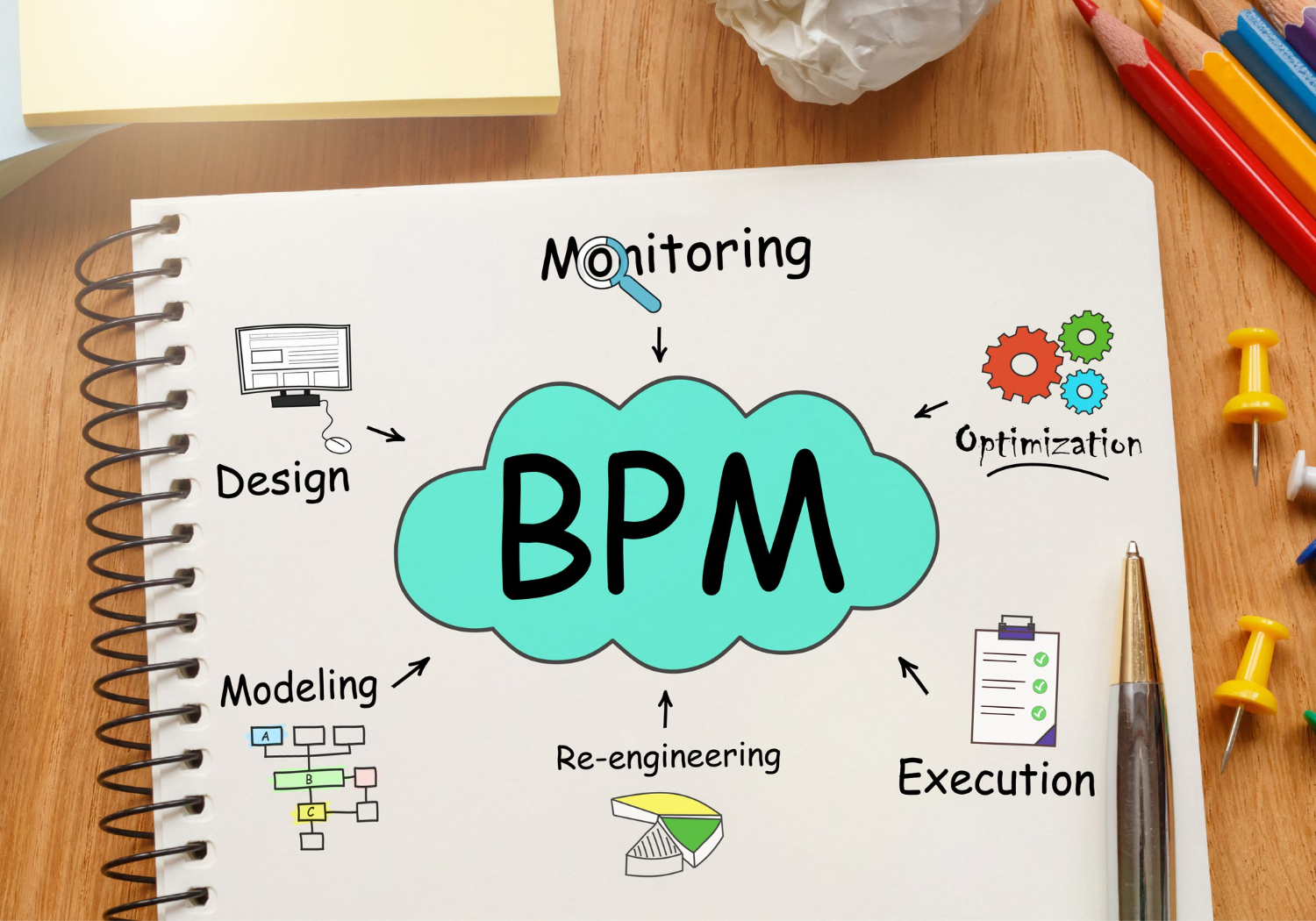
Before evaluating vendors, understand what a BPM platform actually provides.
At its core, a BPM platform enables organisations to:
But BPM platforms vary dramatically in how they deliver these capabilities. The differences matter.
Three critical dimensions:
Scope: Does the platform only handle simple approval workflows, or can it manage complex, enterprise-wide processes with exceptions, integrations, and compliance requirements?
Flexibility: Can you adapt processes quickly when business needs change, or does every modification require expensive consultants and months of work?
Control: Do you own your data and processes, or are you locked into the vendor's infrastructure, roadmap, and pricing?
Understanding BPM fundamentals helps you ask better questions and spot vendor limitations before they become problems.
Use this framework to evaluate platforms systematically.
These are non-negotiable. If a platform fails on these, eliminate it immediately.
✓ Proven process automation capabilities
The platform must handle your core use cases. If you're automating approval workflows, it should excel at routing, notifications, and audit trails. If you're managing cases, it needs robust case management features.
Questions to ask:
✓ Integration with your existing systems
BPM platforms don't exist in isolation. They must connect to your ERP, CRM, email, document management, and legacy systems.
Questions to ask:
✓ Deployment flexibility
Some organisations need cloud for speed and scalability. Others require on-premise for data sovereignty and compliance. Many need hybrid.
Deployment options are a critical differentiator. Platforms that only offer cloud may not meet your regulatory or security requirements. On-premise-only platforms can't support remote workforces effectively.
Questions to ask:
✓ Security and compliance
If you're in financial services, healthcare, government, or any regulated industry, security and compliance are deal-breakers.
Security and compliance features should include:
Questions to ask:
✓ Vendor financial stability
You're betting on this platform for 5+ years. Will the vendor still be around?
Questions to ask:

These significantly impact value but may not be absolute deal-breakers.
Low-code/no-code capabilities
Can business users build and modify processes without waiting for developers? This determines how agile your organisation can be.
Scalability
Will the platform handle 100 users? 10,000? What about transaction volume? Performance under load?
Mobile access
Work doesn't stop at desks. Mobile-friendly interfaces are increasingly essential.
Analytics and reporting
Can you track process performance? Identify bottlenecks? Measure improvement over time?
Vendor support quality
When something breaks at 3 PM on Friday, can you get help? Response times, expertise level, and availability matter.
These add value but aren't critical for initial success.
Process miningAI-powered insightsMulti-language supportIndustry-specific templates
Don't let vendors distract you with nice-to-haves when must-haves aren't met.
Create a comparison matrix to evaluate vendors objectively:
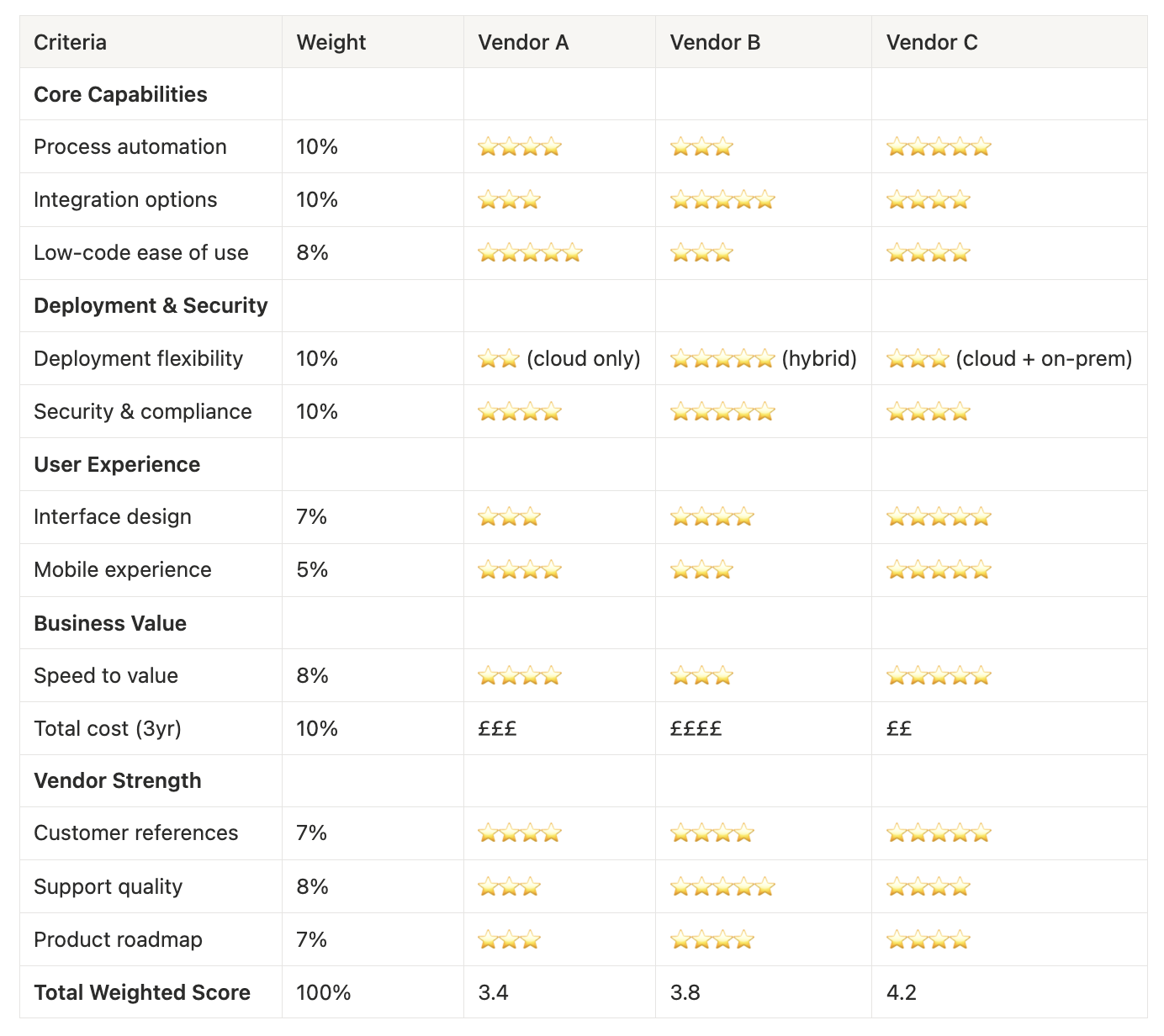
Adjust weights based on your priorities. Security-critical industries weight compliance higher. Fast-moving organisations weight agility higher.
Platform license costs are visible. Hidden costs often exceed them.
Licensing: £50-£200 per user per month
Implementation: £20,000-£200,000+
Ongoing support: 15-25% of license costs annually
Vendor lock-in: What's it cost to leave if you're unhappy?
Customisation: When platform limits are reached
Integration maintenance: Systems change, integrations break
Training for new users: As organisation grows
Year 1:
Years 2-3 (annually):
3-Year TCO: Year 1 + (Year 2 + Year 3) = £_____
Compare TCO across vendors, not just license fees. A platform with higher licenses but lower implementation costs may be more economical.

Vendors control demos. You control the conversation by asking hard questions.
"Show me how your platform handles [our specific use case]"Don't accept generic demos. Make them demonstrate your actual requirements.
"What can't your platform do?"Every platform has limitations. Honest vendors admit them. Dishonest ones claim to do everything.
"How do you handle process changes after deployment?"Speed of change determines your agility. Can changes deploy in hours or weeks?
"Show me a live integration with [our ERP/CRM]"Pre-built connectors should work, not just exist. See it actually pulling data.
"What happens when [our system] updates and breaks the integration?"Integration isn't one-time. It requires ongoing maintenance. Who handles that?
"Can we start in cloud and move to on-premise later?"Business needs change. Flexibility matters. Some vendors lock you into initial choice.
"Do you support hybrid deployment?"Maybe some processes run in cloud, others on-premise. Can the platform handle this?
"Show me your compliance certifications"Don't trust claims. Verify certifications. Ask for documentation.
"How do you handle data residency requirements?"If regulations require data in specific geographies, can the vendor comply?
"What's included in the base price and what costs extra?"Some vendors advertise low base prices but charge for integrations, mobile access, or support.
"What happens if we exceed user/process/transaction limits?"Understand overage charges before they appear on invoices.
"What's your price increase history?"15% annual increases are common. 50% increases happen. Know the pattern.
"Can we speak with three customers using your platform for [similar use case]?"Reference customers should match your industry, size, and use case. Generic references don't help.
"What's your customer retention rate?"High churn indicates dissatisfaction. Vendors rarely volunteer this number.
Some warning signs indicate a platform won't deliver.
If they can't show it working, they probably can't deliver it. Move on.
You may need on-premise for compliance, security, or integration requirements. Lack of flexibility is a risk.
If they claim to integrate with everything but can't show how, it's vaporware.
Recent customers indicate current product quality. Old references may not reflect today's platform.
If you can't understand what you're paying for, expect surprises. Transparent pricing indicates vendor honesty.
"This price expires Friday" or "Sign now to get on our roadmap." Quality platforms don't need pressure tactics.
Confident vendors let you test before buying. Refusal suggests they know the platform won't meet expectations.
Roadmaps aren't commitments. Buy based on current capabilities, not promised futures.
Here's a proven approach to platform selection:
Document what you need:
Research vendors. Narrow to 3-5 based on:
Schedule demos with shortlisted vendors:
Contact customer references:
Test finalists with real use case:
Compare:
Timeline: 12 weeks from requirements to decision. Rushing leads to regret. Taking longer leads to analysis paralysis.
When evaluating BPM platforms, consider why Emakin stands out:
True deployment flexibility: Cloud, on-premise, or hybrid. Start one way, migrate later if needs change. Most vendors lock you into cloud-only.
Transparent pricing: No hidden fees. Clear edition comparison shows exactly what's included. No surprises.
Enterprise capabilities without enterprise complexity: Powerful enough for complex processes. Simple enough for business users to manage.
Integration-first architecture: Built to connect with existing systems. REST APIs, webhooks, and pre-built connectors.
Genuine low-code: Business users build simple processes. Developers extend when needed. Both work in the same platform.
The "best" BPM platform doesn't exist. The best platform for your organisation does.
Key decisions:
Deployment: Can you accept cloud-only, or do you need on-premise/hybrid options?
Capabilities: Does the platform excel at your primary use cases, or does it claim to do everything but excel at nothing?
TCO: What's the real 3-year cost, including hidden expenses?
Vendor: Will they still be here in 5 years? Do they support customers well?
Flexibility: Can you adapt quickly when business needs change?
Don't rush. Take the time to evaluate properly. A poor platform choice costs years of frustration and eventually an expensive migration.
But choose wisely, and you'll enable years of process improvement, efficiency gains, and operational excellence.
The right BPM platform is an investment that pays dividends for years. Choose carefully.
Insights on process automation, product updates, and what's happening at Emakin
Süreç yönetimi, ürün geliştirmeleri ve Emakin'deki güncel gelişmeler

Emakin is a low-code platform that helps businesses quickly design, automate, and manage their business processes effortlessly.





Emakin, kurumların iş süreçlerini daha hızlı, kontrollü ve verimli şekilde yönetmesine olanak tanıyan bir low-code BPM platformudur.