
-
July 16, 2026
Operational Excellence: How BPM Drives Continuous Improvement
Learn more

Low-code vs no-code platforms: Understand the difference with detailed comparison matrix, capability spectrum, team skill requirements, shadow IT risks, cost analysis, real use cases, and decision framework. Choose the right approach for your needs.

The terms "low-code" and "no-code" are often lumped together as if they're interchangeable. Marketing materials promise both will "democratise development" and "empower citizen developers."
But they're fundamentally different approaches with different capabilities, different target users, and different risk profiles.
Understanding the distinction matters because choosing the wrong approach—or failing to govern it properly—can create more problems than it solves. No-code tools in the hands of well-meaning business users can spawn shadow IT chaos. Low-code platforms without proper oversight can create technical debt that's expensive to unwind.
This guide explains what each approach actually means, when to use which, and how to implement either successfully without creating new problems.

No-code platforms allow non-technical users to build applications using entirely visual interfaces. No programming required. No scripting. No formulas beyond simple spreadsheet-like logic.
Key characteristics:
Common no-code tools:
What no-code excels at:
What no-code can't do:
No-code is powerful for simple, contained use cases. But it hits a ceiling quickly when requirements become complex.

Low-code platforms enable rapid application development through visual interfaces supplemented by coding when needed. The "low" in low-code means you write less code, not zero code.
Key characteristics:
Common low-code platforms:
What low-code excels at:
What low-code requires:
Low-code sits between traditional development and no-code, offering speed and accessibility without sacrificing power and flexibility.
It's more useful to think of a spectrum rather than two distinct categories:
Pure No-Code → No-Code Plus → Low-Code → Pro-Code
The key question: Where on this spectrum does your use case sit?
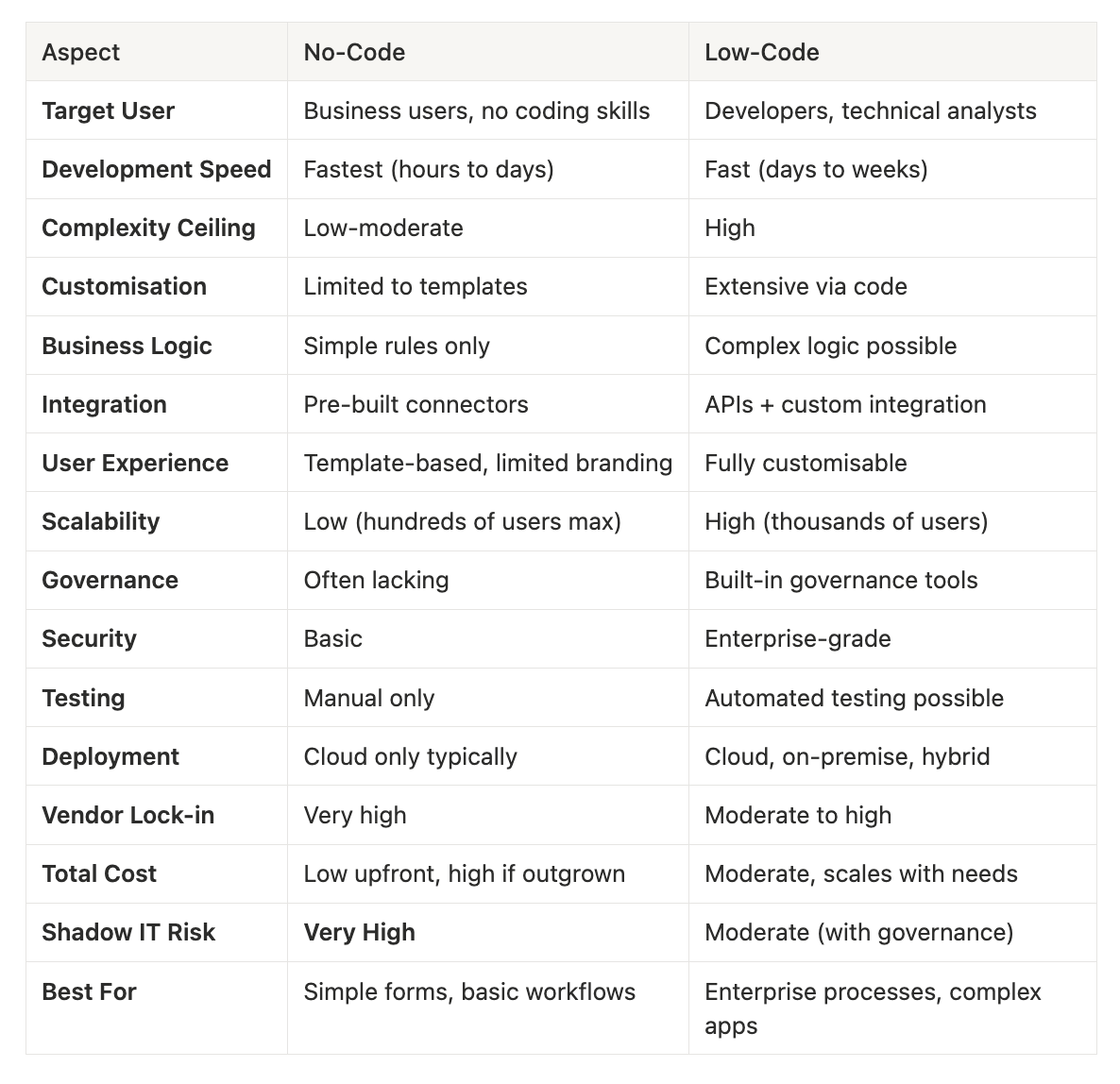
No-code makes sense for:
Simple data collection: Forms, surveys, feedback collection. No complex logic, just capture and store data.
Personal or team productivity tools: Task trackers, simple databases, content calendars. Low stakes, limited users.
Quick prototypes: Test an idea before investing in proper development. Validate concept, then rebuild if successful.
One-off projects: Event registration, simple campaign landing pages. Short lifespan, limited scope.
Scenarios where no-code works:
Critical requirement: The use case must stay simple. Once you need customisation, complex logic, or enterprise features, you've outgrown no-code.
Low-code is appropriate for:
Business process automation: Approval workflows, request management, document routing. Process automation that spans departments and systems.
Enterprise applications: Customer portals, employee self-service, partner management. Production applications with many users.
System integration: Connecting multiple systems, orchestrating workflows across platforms. Requires API calls and complex data mapping.
Applications requiring governance: Compliance, audit trails, role-based access. Enterprise security and control needed.
Complex business logic: Multi-step approval chains, dynamic routing based on data, exception handling. Rules that can't be expressed in simple if-then statements.
Scenarios where low-code works:
No-code's accessibility is both its strength and its danger. Business users can build tools without IT involvement—which sounds great until you consider the risks:
Data governance breakdown:
Integration chaos:
Business continuity risks:
Cost explosion:
Real-world example: A marketing team built a customer feedback form in a no-code tool. It grew to include approval workflows, integration with their CRM, and reporting. When the creator left, no one could maintain it. IT had to rebuild it properly in a governed platform—essentially paying twice.
The solution: Govern no-code usage. Allow it for appropriate use cases, but with guardrails:

Different approaches require different skills:
Minimum skills:
Not required:
Training time: Hours to days
Minimum skills:
Helpful but not required:
Training time: Weeks to months (depending on complexity)
Required skills:
Training time: Years of education and experience
Implication: Match the approach to your team's capabilities. Don't expect business users to succeed with low-code platforms designed for developers.
The total cost picture is more complex than license fees suggest:
Upfront: Very low
Hidden costs:
Best case: Use case stays simple, tool works for years, very low TCO
Worst case: Tool outgrown quickly, expensive rebuild, data migration nightmare
Upfront: Moderate
Hidden costs:
Best case: Platform scales with needs, no rebuilds, automation compounds value over years
Worst case: Wrong platform chosen, vendor lock-in, expensive migration
Upfront: High
Hidden costs:
Best case: Complete control, perfect fit, long useful life
Worst case: Cost overruns, delayed delivery, maintenance burden
Scenario 1: Simple feedback form
Requirement: Collect customer feedback after support interactions.
Right approach: No-code
Why not low-code?: Overkill. The simplicity of the requirement doesn't justify the complexity or cost of a low-code platform.
Scenario 2: Purchase approval workflow
Requirement: Route purchase requests through multi-level approval based on amount, department, and budget availability.
Right approach: Low-code
Why not no-code?: Requirements exceed no-code capabilities. Business logic is too complex, integration is required, and governance is essential.
Scenario 3: Employee onboarding
Requirement: Manage new employee onboarding from offer acceptance through first day.
Right approach: Depends on complexity
No-code sufficient if:
Low-code required if:
Scenario 4: Customer portal
Requirement: External-facing portal for customers to submit requests, track status, and access documents.
Right approach: Low-code (or traditional development)
Why not no-code?: No-code tools can't deliver the customisation, security, and scalability required for production customer-facing applications.
Use this decision tree:
Question 1: Can the requirement be expressed in simple if-then rules?
Question 2: Does it need to integrate with other systems via API?
Question 3: Will it have more than 50 active users?
Question 4: Does it handle sensitive data or require compliance audit trails?
Question 5: Will it be a critical business process?
General principle: When in doubt, choose low-code over no-code. The incremental complexity is worth avoiding the risk of outgrowing a no-code tool.
Regardless of which approach you choose, governance is essential:
Low-code and no-code aren't competing approaches. They're different tools for different jobs.
No-code is brilliant for simple, contained use cases where speed matters more than sophistication. Forms, basic workflows, personal productivity tools—these don't need the power of low-code.
Low-code is essential for business-critical applications, complex processes, and anything requiring integration, customisation, or enterprise capabilities.
The mistake is using no-code for cases that outgrow it, or using low-code for simple tasks that don't need it.
The winning approach:
Don't let vendor marketing or personal preferences drive the decision. Let requirements and capabilities determine the right fit.
And remember: the goal isn't to be "low-code" or "no-code." The goal is to solve business problems efficiently and sustainably. Choose the approach that does that best.
Insights on process automation, product updates, and what's happening at Emakin
Süreç yönetimi, ürün geliştirmeleri ve Emakin'deki güncel gelişmeler

Emakin is a low-code platform that helps businesses quickly design, automate, and manage their business processes effortlessly.





Emakin, kurumların iş süreçlerini daha hızlı, kontrollü ve verimli şekilde yönetmesine olanak tanıyan bir low-code BPM platformudur.