
-
July 16, 2026
Operational Excellence: How BPM Drives Continuous Improvement
Learn more

Workflow diagram guide: Traditional BPMN vs automation-first design. Learn step-by-step process mapping, when to use complex notation vs simple executable diagrams, Emakin's simplified approach, and how to build automation-ready workflows that work.

Workflow diagrams transform invisible processes into visible maps. They show how work flows from start to finish, who's involved, where decisions happen, and where bottlenecks hide.
But there's a critical choice to make before you start drawing: Are you documenting for documentation's sake, or are you designing for automation?
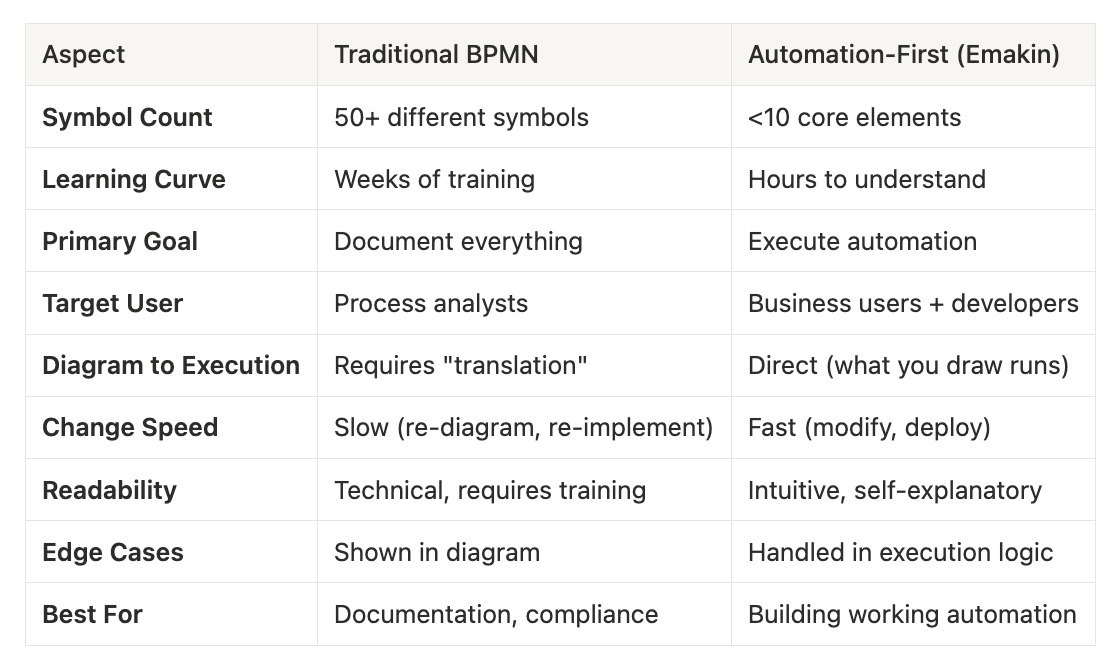
This distinction matters because different goals require different approaches. Traditional workflow diagrams use complex BPMN notation with dozens of symbols. Automation-focused diagrams prioritise simplicity and executability.
This guide walks through both approaches, explains when to use each, and shows why simplicity wins when your goal is to actually automate work—not just document it.

A workflow diagram is a visual representation of a business process showing the sequence of tasks, decisions, and handoffs required to complete work.
Key elements:
Workflow diagrams serve multiple purposes:
Before choosing notation or tools, understand your primary goal.
Goal: Capture every detail of how work currently flows
Characteristics:
Best for: Process analysts, consultants documenting existing processes, regulatory compliance documentation
Problem: The diagram becomes the goal. Teams spend weeks perfecting diagrams that never become automated processes.
Goal: Design processes that can actually be executed in software
Characteristics:
Best for: Organisations implementing workflow automation, BPM platforms, teams building executable processes
Advantage: The diagram is the blueprint. What you draw becomes what executes. No translation layer needed.
This is Emakin's approach. We deliberately simplified workflow notation because complex BPMN creates a barrier between design and execution. Our process designer uses only the essential elements needed to build automation that works.
BPMN (Business Process Model and Notation) is the international standard for workflow diagrams. It's comprehensive, detailed, and... overwhelming.
BPMN symbol complexity:
Example BPMN diagram for a simple approval:
The problem: A process that takes 30 seconds to explain takes 30 minutes to diagram correctly in BPMN. Most people can't read it without training.
When BPMN makes sense: You're working with process analysts who know the notation, you need regulatory documentation, or you're integrating with legacy BPM systems that require BPMN.
When it doesn't: You're building automation for actual business users who need to understand and modify processes.

Emakin uses a deliberately simplified process notation. Instead of 50+ symbols, we use the minimum needed to build executable automation.
Pools: A process container. Your entire workflow lives in one pool. Simple.
Tasks: Work to be done. That's it. No subtypes, no special icons. A task is a task.
Routes: Connections showing what happens next. Instead of complex gateway types, routes have simple conditions.
Roles: Who does the work. Assign tasks to roles, not individual symbols for different actor types.
Forms: Data capture at each step. Built-in, not an afterthought.
Actions: What users can do (Approve, Reject, Send Back). Clear and simple.
Reason 1: Non-technical people can design processes
Traditional BPMN requires training. Emakin's approach is intuitive. If you can draw a flowchart, you can design an automated process.
Reason 2: What you see is what executes
There's no "translation" from diagram to automation. The process you design is the process that runs. No surprises.
Reason 3: Faster iteration
Simple notation means faster changes. Business requirements change constantly. Your process design tool shouldn't slow you down.
Reason 4: Focus on logic, not symbols
Time spent learning BPMN notation is time not spent thinking about actual process logic. Simplicity keeps focus where it belongs.
Whether you're using Emakin or another platform, this approach works for automation-focused diagrams.
Don't start drawing until you understand the process. Premature diagramming leads to wrong diagrams.
Activities:
Questions to answer:
Every process has a clear beginning and conclusion.
Start trigger examples:
End point examples:
Clarity matters: "Process starts" is vague. "Customer clicks 'Submit Order' button" is specific.
List every task that happens between start and end.
Use clear, actionable labels:
Focus on what needs to happen, not how to diagram it. You'll add the visual representation later.
Where does the flow branch based on conditions?
Common decision points:
In Emakin: These become Routes with conditions. No special gateway symbols needed.
Who does each task?
In traditional BPMN: You create swim lanes and assign tasks to lanes.
In Emakin: You assign Roles directly to tasks. Simpler. The system handles routing automatically.
Now you're ready to build in your automation platform.
In Emakin's process designer:
The beauty: This isn't just a diagram. It's the actual automation. When you're done designing, you're done. Deploy and it runs.
Before deploying, test:
In automation platforms: You can test immediately. No waiting for developers to "implement" your diagram.
Once tested, deploy to production.
Monitor:
Iterate based on data. The advantage of automation platforms is that changes deploy in hours, not weeks.
Regardless of notation, certain patterns appear repeatedly:
Emakin implementation: One pool, three tasks (Submit, Review, Notify), two routes (approved/rejected).
Emakin implementation: Route conditions check amount and direct to appropriate approval tasks. No complex gateway symbols needed.
Some work happens simultaneously:
Emakin implementation: Tasks can execute in parallel. Routes define when all must complete before continuing.
Free options:
Professional:
Use when: You need formal documentation, regulatory compliance, or integration with tools that require BPMN.
BPM Platforms (design and execute):
Use when: Your goal is to actually automate the process, not just document it.
Key advantage: No gap between design and execution. The diagram becomes the automation.
Mistake 1: Over-complicating simple processes
A three-step approval doesn't need complex BPMN notation. Keep it simple.
Mistake 2: Designing before understanding
Drawing before you understand the process leads to multiple iterations and frustration. Understand first, then design.
Mistake 3: Ignoring the end goal
If your goal is automation, don't use documentation notation. Use automation-focused design from the start.
Mistake 4: Missing the exceptions
Diagrams showing only the happy path don't reflect reality. What happens when approvals are rejected? When data is incomplete?
Mistake 5: No validation
A diagram created in isolation reflects how you think the process works, which may be wrong. Always validate with people who do the work.
Mistake 6: Perfect diagrams, no execution
Teams spend months perfecting BPMN diagrams that never become automated processes. If your goal is automation, start with executable design.
The ultimate test: Can your diagram become working automation?
Traditional BPMN approach:
Automation-first approach (Emakin):
The difference: No translation layer. No developers needed for simple processes. Direct path from design to execution.
Process: Employees submit purchase requests. Approval required based on amount.
Traditional BPMN documentation:
Emakin automation design:
Implementation time:
The outcome: Both achieve the same result. But one is faster, simpler, and requires no translation.

Workflow diagrams aren't one-size-fits-all. Choose your approach based on your actual goal:
If your goal is formal documentation:
If your goal is automation:
Emakin's philosophy: Most organisations don't need the complexity of full BPMN. They need simple, clear process designs that become working automation quickly.
We deliberately chose simplicity because:
The goal isn't to create beautiful diagrams. The goal is to automate work that improves business outcomes.
Choose the approach that gets you there fastest.
Insights on process automation, product updates, and what's happening at Emakin
Süreç yönetimi, ürün geliştirmeleri ve Emakin'deki güncel gelişmeler

Emakin is a low-code platform that helps businesses quickly design, automate, and manage their business processes effortlessly.





Emakin, kurumların iş süreçlerini daha hızlı, kontrollü ve verimli şekilde yönetmesine olanak tanıyan bir low-code BPM platformudur.