-
July 16, 2026
Operational Excellence: How BPM Drives Continuous Improvement
Learn more

Learn how to transform chaotic quotation management into a streamlined, profitable process with real-world examples, practical implementation steps, and measurable results.
.jpg)
Managing quotation requests shouldn't feel like herding cats. Yet for many service companies—whether in shipping, electronics, construction, or professional services—that's exactly what it feels like. Requests pour in from every direction: phone calls, emails, social media, partner channels, walk-ins. Sales teams scramble to respond, managers lose visibility, and customers experience inconsistent service.
Sound familiar?
This guide walks through how to transform chaotic quotation management into a streamlined, profitable process using business process management. We'll use a real implementation at an international shipping company as our practical example. But the principles apply whether you're quoting electronics installations, construction projects, or professional services.
Let's start with the uncomfortable truth: most companies are losing money on their quotation process, and they don't even know it.
Lost Opportunities
When response times stretch from hours to days, customers move on. One shipping company we worked with was averaging 24-48 hours to respond to enquiries. In competitive industries where customers contact multiple providers simultaneously, slow response means lost business.
Wasted Effort
Without a unified system, salespeople unknowingly duplicate work. Customer enquiries coming through different channels often result in multiple team members preparing quotes for the same customer. This isn't just inefficient; it's embarrassing.
Pricing Inconsistency
Each salesperson develops their own approach to pricing. The result? Inconsistent margins, customer confusion, and frequent pricing errors that either lose deals or erode profitability.
Brand Damage
When one customer receives a professional, detailed quotation and another gets a hastily assembled email with inconsistent pricing, it damages your reputation. Customers talk, compare notes, and question your professionalism.
Management can't answer basic questions:
Without data, they're flying blind. Every strategic decision is based on gut feeling rather than facts.
The chaos doesn't end when customers accept quotations. Communication breakdowns between sales and operations create costly mistakes: warehouse teams don't know what materials to prepare, service teams arrive unprepared, and customer expectations aren't communicated properly.
When companies decide to fix their quotation chaos, they typically look at off-the-shelf CRM systems.
They quickly hit walls.
Generic CRM systems are built for generic businesses. Service companies often need industry-specific workflows, complex pricing calculations, warehouse integration, and approval structures that off-the-shelf systems can't handle—at least not without tens of thousands in consulting fees and 6-12 month customisation timelines.
What frustrates companies most is the lack of flexibility. Want to add a new approval step? That requires expensive consulting. Need to capture industry-specific data? Custom fields that don't integrate properly. Want to change pricing calculations? More consulting fees.
As one electronics company put it: "We don't want something where we can make no changes and we're tied to that."
Quotation processes don't exist in isolation. They need to connect with multiple lead sources, existing internal systems, warehouse management, accounting, and communication tools. Generic CRMs make integration difficult and expensive.
The sticker price looks reasonable—until companies calculate per-user licensing fees, implementation consulting, ongoing customisation, training costs, and integration expenses.
Companies realise they need a different approach: flexible enough to adapt, powerful enough to scale, and affordable enough to justify the investment—that's where low-code platforms come in.
Before diving into the "how," let's define "what." What does excellent quotation management actually look like?
Every quotation request—regardless of source—flows into one unified system. Complete visibility.
Requests automatically assign based on rules you define: geography, service type, workload balancing, or expertise.
Sales teams follow consistent processes, capturing all necessary information before creating quotations. The system prevents incomplete submissions.
Salespeople see actual cost structure: parts, labour, materials, overhead, desired margin. Management sets pricing rules centrally.
Quotations route automatically to appropriate approvers based on value, type, or margin. Workflow automation ensures quality control happens before customer communication.
Approved quotations generate professional PDFs using company templates. Every customer receives consistent, branded documentation.
Everyone sees exactly where each quotation stands. No more "Did anyone follow up with that customer?" conversations.
When customers accept quotations, all information flows automatically to operations: no more "sales forgot to tell us" complaints.
Management sees real-time dashboards: pipeline health, conversion rates, response times, team performance, profitability.
This isn't theoretical. This is what's possible when quotation management is done right.
Now let's get practical. How do you actually build this? We'll walk through the implementation at an international shipping company that transformed their quotation chaos into a streamlined operation.
The Challenge
Leads were arriving through phone calls, emails, social media (Facebook, Instagram, WhatsApp), agency partners, website forms, and referrals. There was no single place to see all requests.
The Solution
Integration with multiple lead sources, automatically creating a case for each new request regardless of channel.
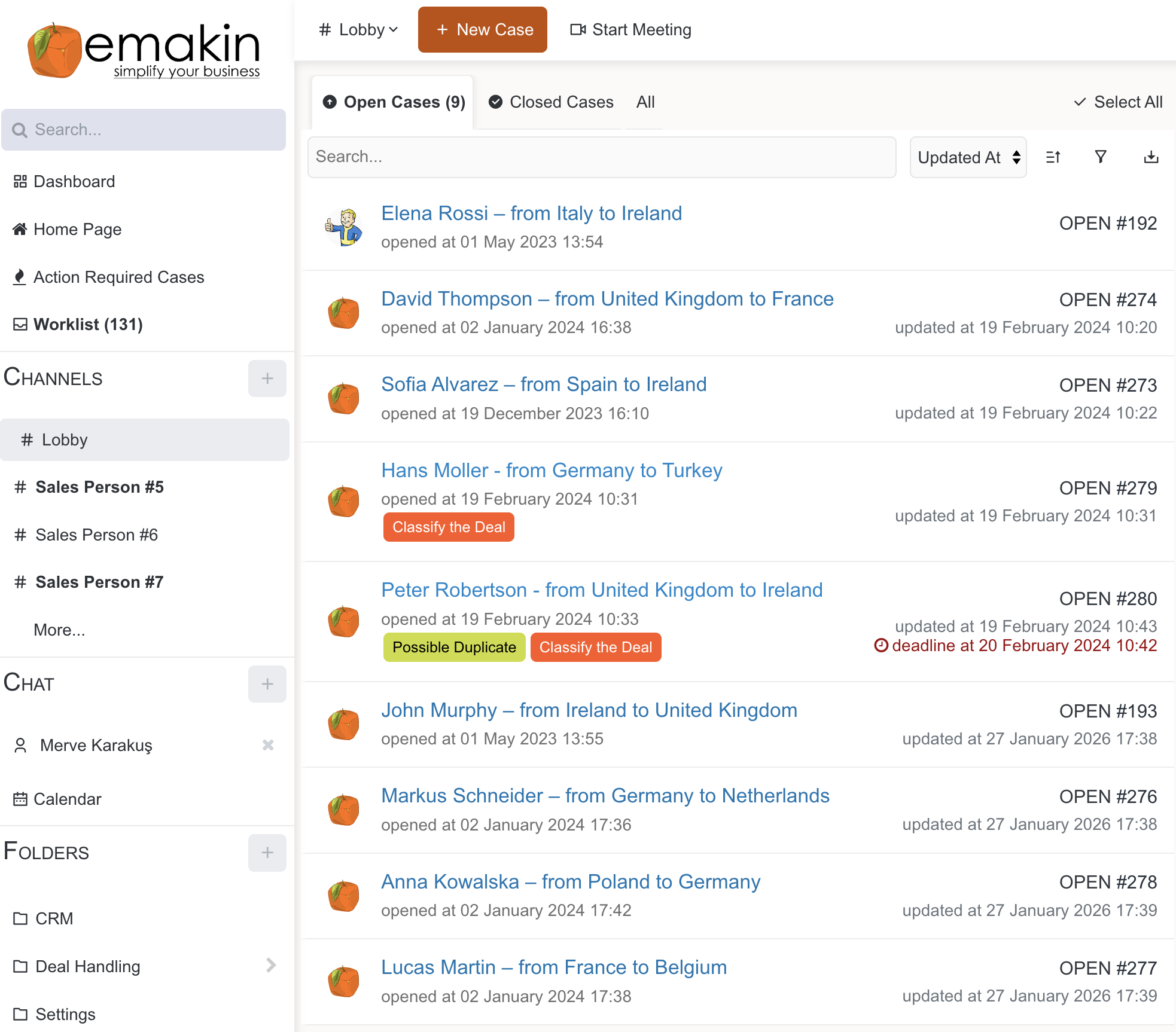
What This Looks Like
A sales representative sees a unified worklist showing all assigned tasks across different process stages. Each case has:
The system tracks everything:
Implementation Tips:
Common Pitfall to Avoid:
Don't try to integrate every possible channel on day one. Start with 2-3 main sources, get them working well, then add others incrementally.
The Challenge
Sales managers had no visibility into the pipeline. They couldn't see which leads were hot, which were stalling, or where salespeople needed support.
The Solution
A visual pipeline showing all open cases with status labels and progression tracking using adaptive case management.
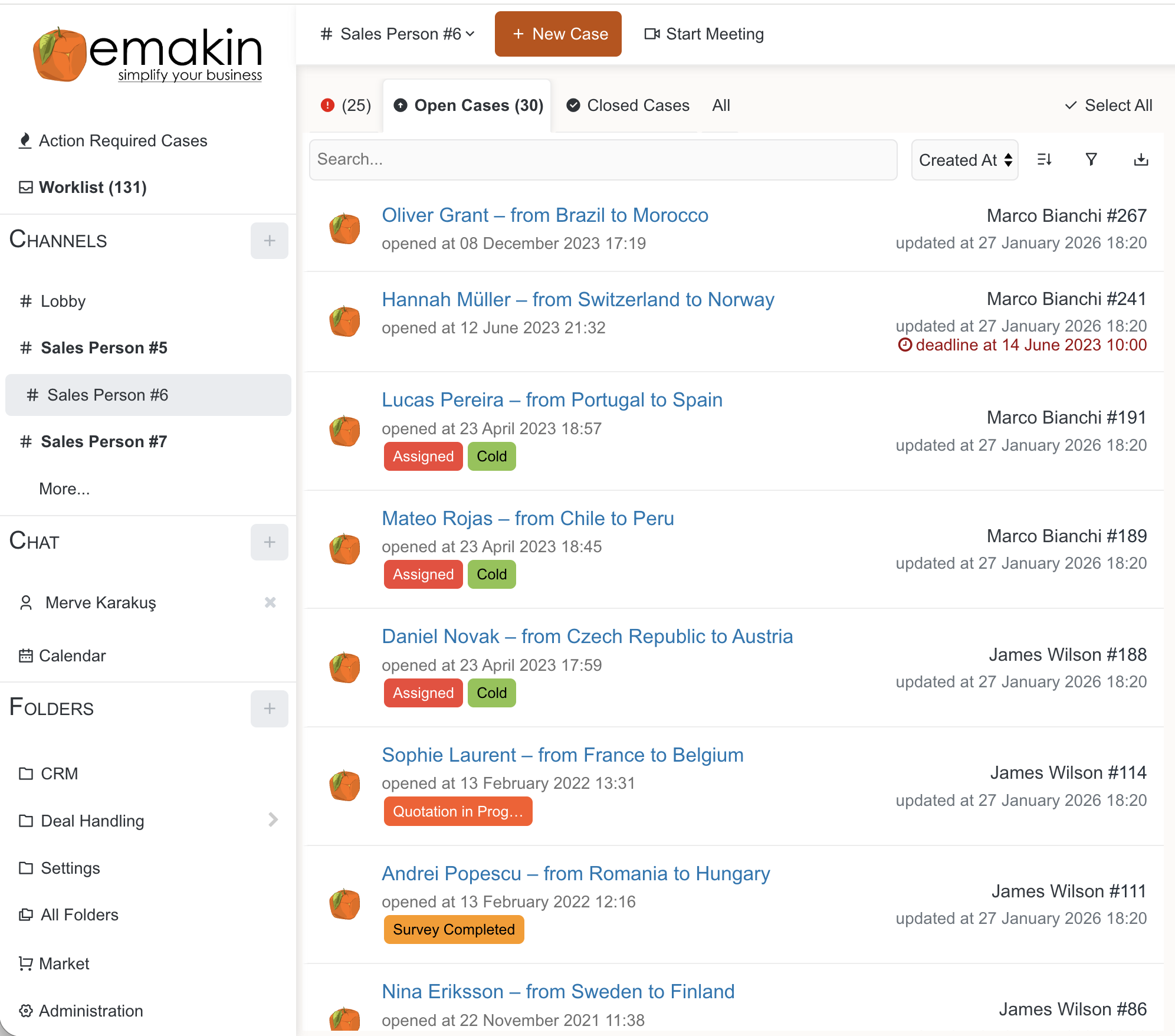
What This Looks Like
The dashboard displays open cases organised by customer and status:
Each case shows customer details, status badges, assigned person, and timestamps.
Implementation Tips:
The Impact: Sales managers instantly see pipeline health, identify bottlenecks, and redistribute workload. Everything is data-driven.
The Challenge
Every salesperson captured customer information differently, leading to incomplete data and confusion during service delivery.
The Solution
Structured customer profile forms with mandatory fields and tabbed organisation using dynamic forms that guide users through data capture.
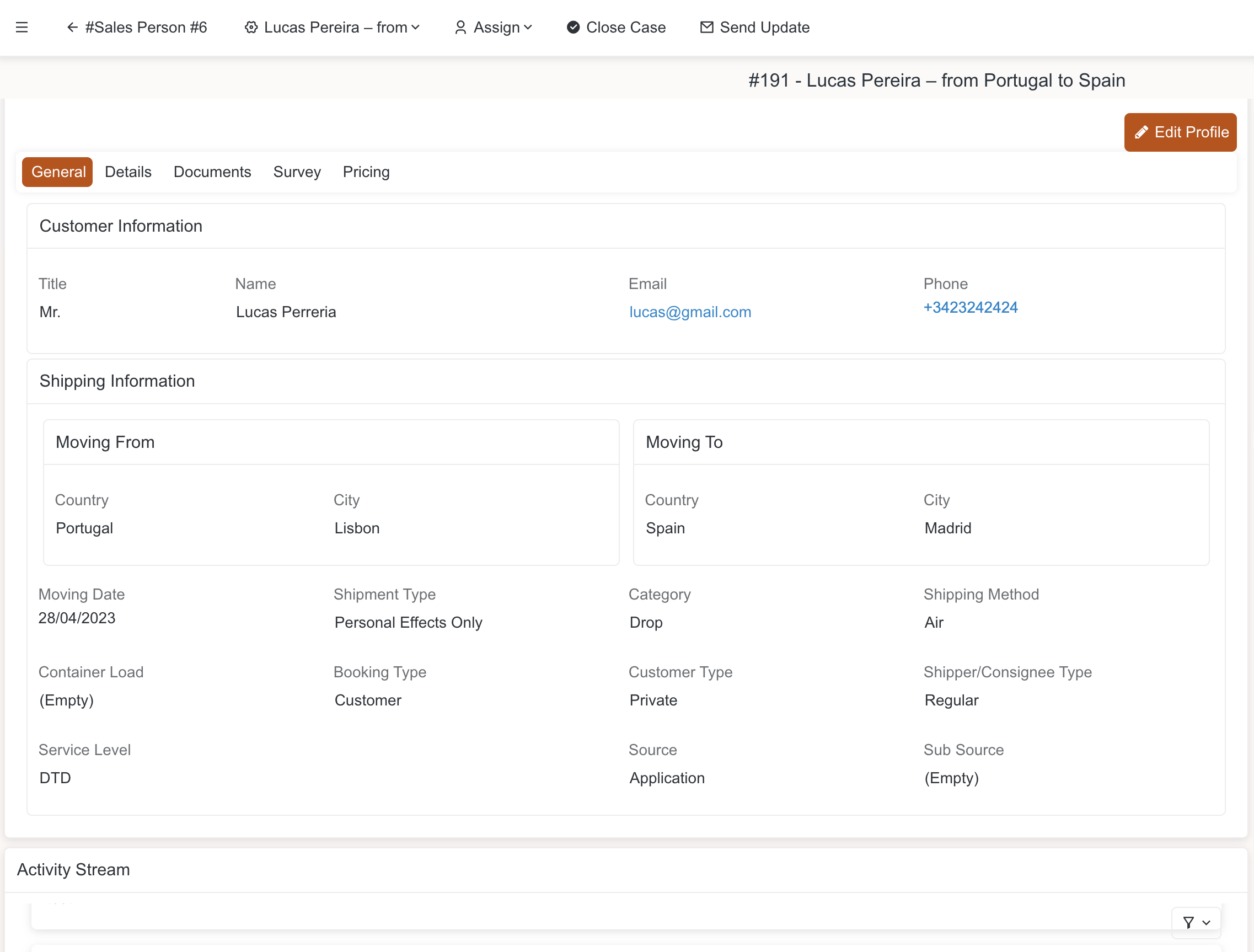
What This Looks Like
A comprehensive customer profile with tabbed interface:
Tab 1: General Information
Tab 2: Details
Tab 3: Documents
Tab 4: Survey
Tab 5: Pricing
Implementation Tips:
Common Pitfall to Avoid:
Don't create 50 mandatory fields. Salespeople will find workarounds or simply won't use the system. Capture essentials first; enhance later.
The Challenge
Salespeople didn't understand actual cost structures, leading to underpriced quotations and eroded margins.
The Solution
A transparent cost configuration system showing all service costs and profit margins.
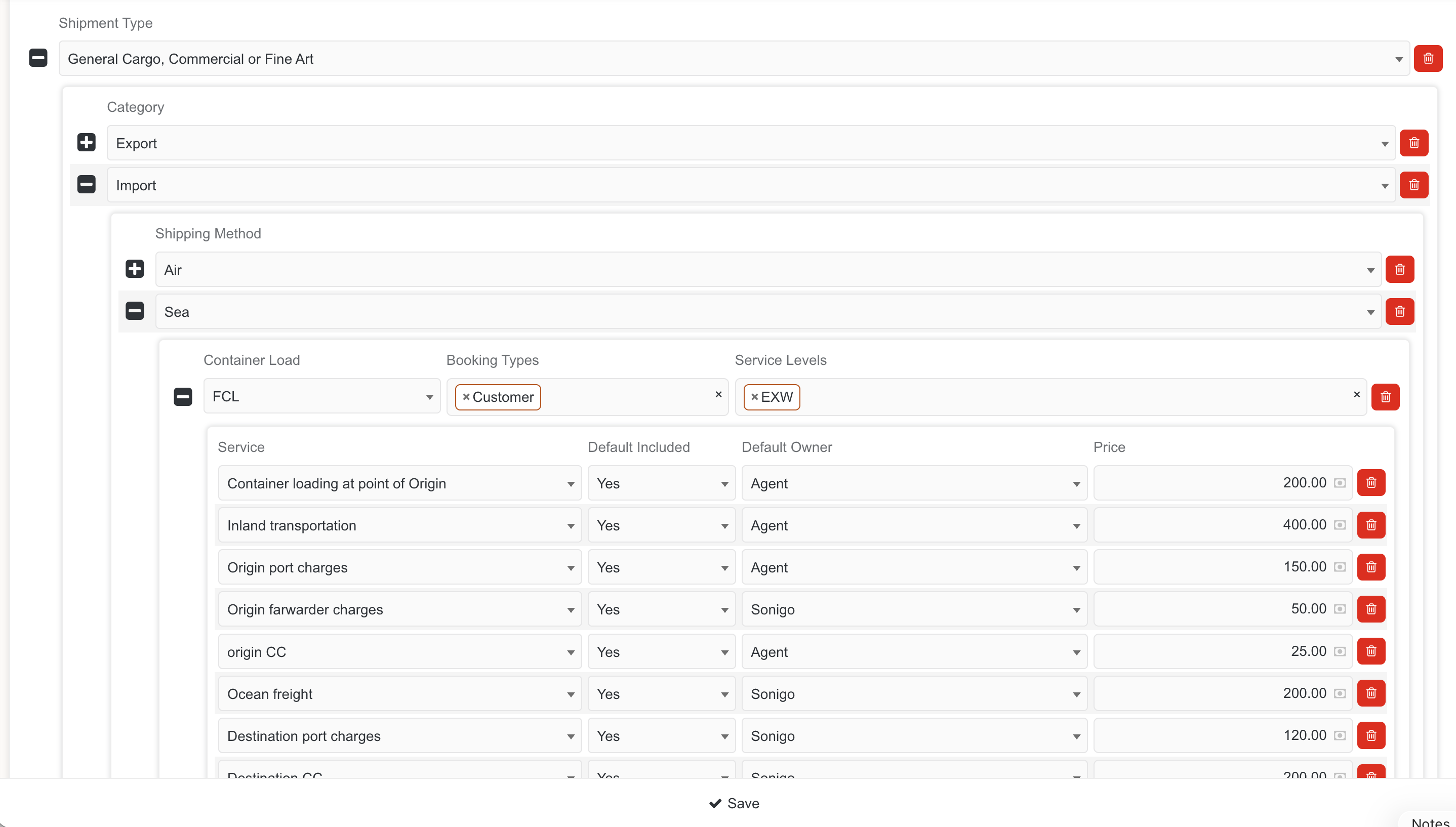
What This Looks Like
Hierarchical cost structure setup showing:
Service Components:
For Each Component:
Pricing Calculation Screen:Shows:
Implementation Tips:
The Impact:
Salespeople see true cost structure and make informed pricing decisions. Management controls pricing rules centrally, ensuring consistency and profitability. No more "I didn't know we'd lose money on that deal" conversations.
The Challenge
Quotations were going directly to customers without management review, leading to pricing errors and non-standard terms.
The Solution
Configurable approval workflows based on quotation value, service type, or profit margin.
How It Works:
Step 1: Sales Creates Quotation
Step 2: Automatic RoutingSystem routes to appropriate approver based on business rules:
Step 3: Manager ReviewsManager sees:
Manager can:
Step 4: Send to CustomerOnly approved quotations can be sent. System prevents sending unapproved quotes.
Implementation Tips:
The Impact:
Quality control happens before customer communication. Management maintains pricing discipline and brand consistency. All quotations follow company standards before leaving the building.
The Challenge
Each prepared quotation PDF was different, creating an unprofessional image and customer confusion.
The Solution
Standardized PDF templates with automatic generation and email distribution.
How It Works:
Template Design:
Automatic Generation:
Once approved, system:
Multi-Language Support:
Email Distribution:Automated email includes:
Implementation Tips:
The Impact:
Every customer receives a professional, consistent quotation. No more formatting inconsistencies or missing information. Brand image protected. Professional appearance builds trust and increases conversion rates.
The Challenge
Leads got stuck in the pipeline with no follow-up, and deadlines were missed without anyone noticing.
The Solution
Visual milestone tracking with automated reminders and deadline alerts.
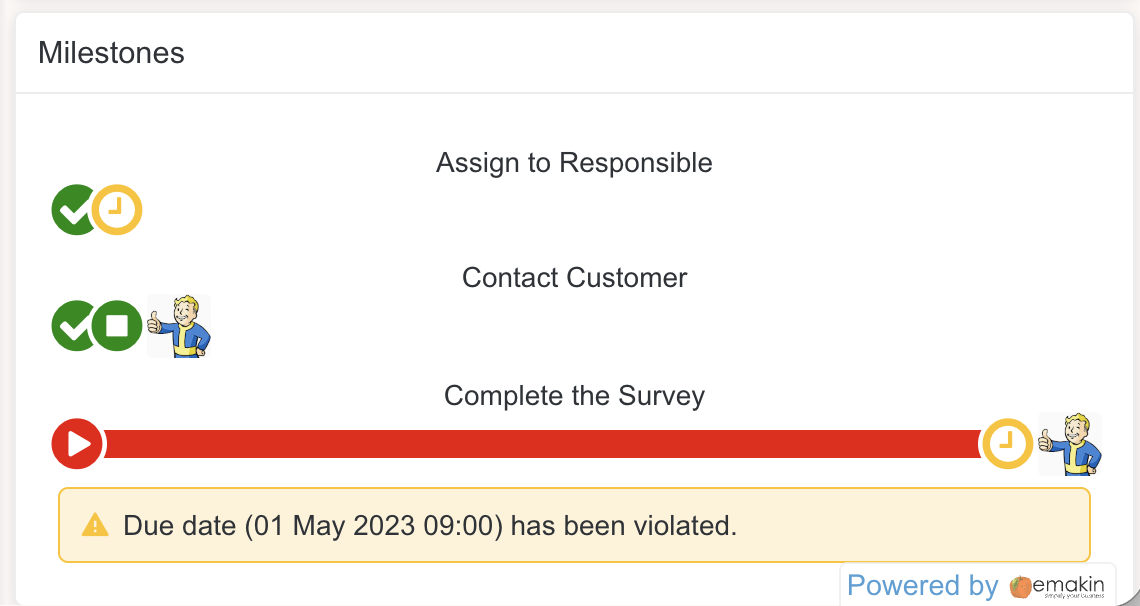
What This Looks Like
Process visualization showing:
Completed Steps (Green checkmarks):
Current Step (In progress):
Upcoming Steps (Pending):
Deadline Violations:
Automated Reminders:
Implementation Tips:
The Impact:
Nothing falls through cracks. System tracks every lead through the entire process and alerts team members when action is required. No more "I forgot about that customer" situations.
The Challenge
Technical information from sales wasn't reaching operational teams, causing preparation mistakes and service delivery issues.
The Solution
Integrated survey module capturing all technical specifications needed for service delivery.
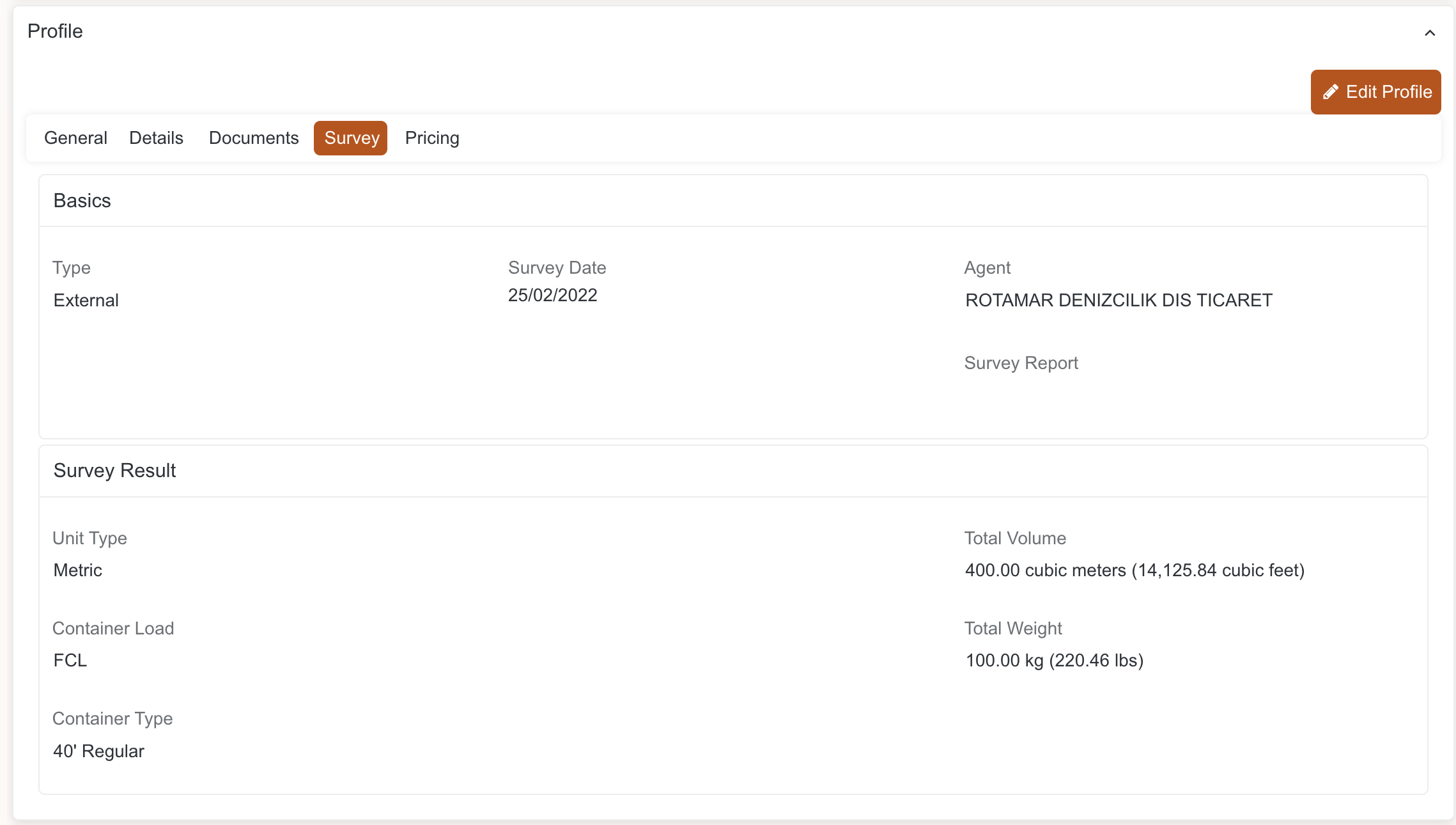
What This Looks Like
Survey Basics:
Technical Specifications:
Site Assessment:
Activity Stream:
Implementation Tips:
The Impact:
Operations and warehouse teams see exactly what was assessed. No miscommunication about what materials to prepare or what challenges to expect. Service delivery teams arrive fully prepared.
The Challenge
Warehouse teams didn't know what materials to prepare, causing delays and mistakes when service teams arrived without proper supplies.
The Solution
Integrated inventory management automatically calculating material requirements for each accepted quotation.
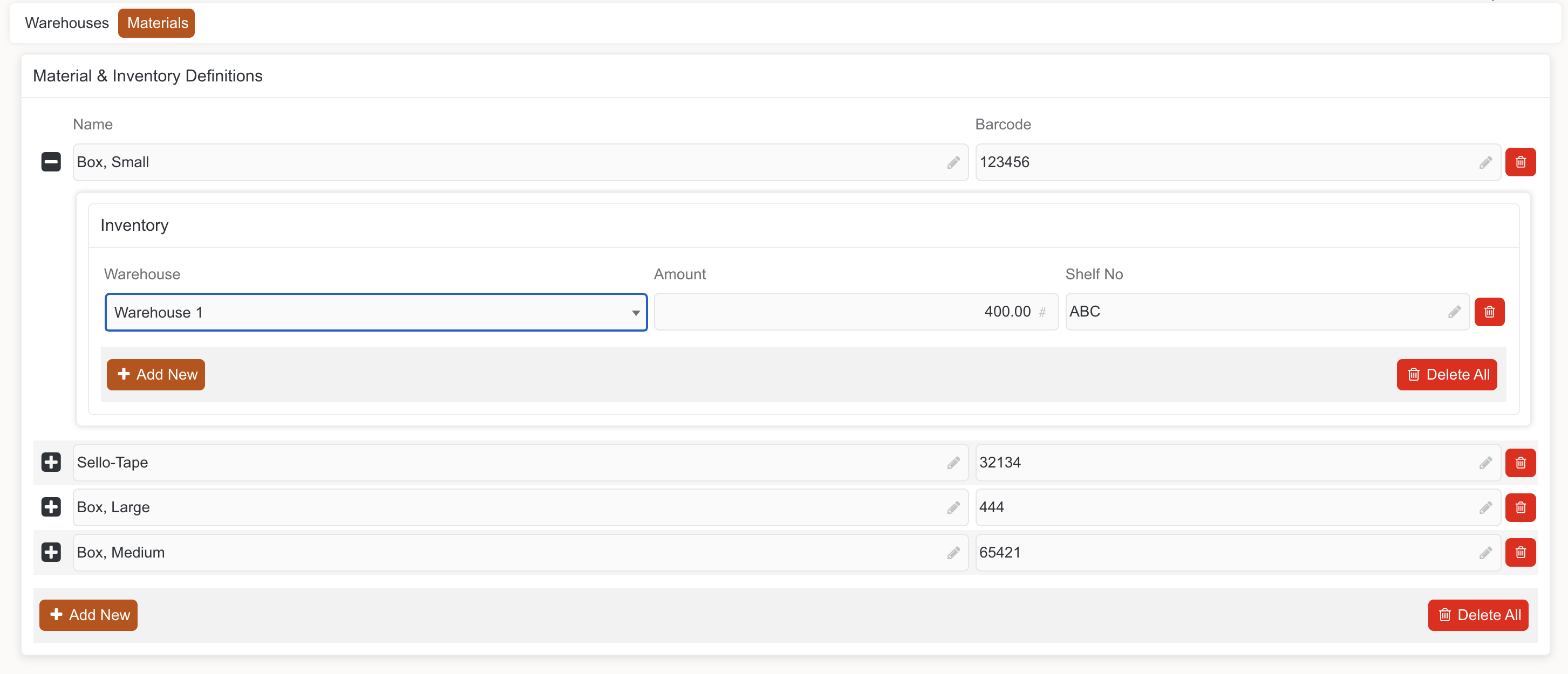
What This Looks Like
Material Definitions:
Multi-Warehouse Inventory:
Automatic Material Calculation:When quotation is accepted:
Barcode Scanning:
Reorder Alerts:
Implementation Tips:
The Impact:
Service teams arrive with exactly what they need. No more forgotten materials or bringing wrong quantities. Professional service delivery from start to finish. Reduced waste from over-ordering.
The Challenge
Leads came from multiple sources, and there was no way to track which channels were performing best or justify marketing spend.
The Solution
Integration with external lead providers and internal systems, all feeding into the unified platform with proper source attribution.
Integrated Sources:
Digital Channels:
Offline Channels:
Partner Channels:
System Imports:
How It Works:Each lead automatically tagged with:
Reporting Capabilities:
Implementation Tips:
The Impact:
Complete lead attribution. Companies can now analyze which marketing channels deliver the best ROI and adjust spending accordingly. No more guessing which advertising works. Marketing becomes data-driven and accountable.
Theory is nice. Results matter. Here's what happened when this shipping company implemented their unified quotation management system:
Before: Customer enquiries sat in email inboxes or were passed around verbally. Average response time was 24-48 hours.
After: Every enquiry automatically enters the system, gets assigned immediately, and appears on someone's task list. Average response time dropped to under 4 hours.
Business Impact: In industries where customers contact multiple providers, fast response wins deals. The company estimates 15-20% more conversions simply from responding faster.
Before: Multiple salespeople unknowingly working on same lead was common, wasting roughly 20% of sales capacity.
After: System automatically detects and prevents duplicate cases based on customer details, contact information, and enquiry specifics.
Business Impact: Sales team capacity effectively increased by 20% without hiring anyone. Same team handles more volume.
Before: Each salesperson had their own template, style, and approach. Customer experience varied wildly.
After: Every customer receives the same professional, branded quotation format with consistent information, terms, and presentation.
Business Impact: Brand perception improved significantly. Customers commented on the professional appearance. Reduced confusion and questions because information was clear and consistent.
Before: Quotations went directly to customers. Management only saw them if something went wrong (usually after the fact).
After: Every quotation requiring approval (based on value or margin thresholds) routes to appropriate manager. Nothing goes out without approval.
Business Impact: Pricing errors dropped to nearly zero. Non-standard terms flagged before becoming problems. Management maintains control without micromanaging.
Before: No reliable tracking, but management estimated 15-20% of quotations converted to contracts.
After: System tracks every quotation from creation to outcome. Actual measured conversion rate: 28%.
Business Impact: More revenue from same lead volume. Better conversion likely due to faster response, professional presentation, and consistent follow-up.
Before: Profit margins were essentially unknown until after job completion. Frequent underpricing.
After: Every quotation shows estimated profit margin. Management can identify and address low-margin deals before approval.
Business Impact: Average deal profitability increased by approximately 12%. Some deals are declined or repriced rather than accepted at losses.
Before: Warehouse miscommunication caused frequent mistakes: wrong materials prepared, quantities incorrect, service teams arriving unprepared.
After: Warehouse receives material requirements automatically when quotations are accepted. Barcode confirmation ensures accuracy.
Business Impact: 95% reduction in preparation errors. Fewer customer complaints. Reduced costs from emergency material runs. More professional service delivery.
Before: Management couldn't answer basic questions about pipeline, performance, or profitability without manually gathering data.
After: Real-time dashboards show everything: pipeline health, conversion rates, team performance, source attribution, profitability analysis.
Business Impact: Strategic decisions now based on data rather than intuition. Problems identified and addressed quickly. Resource allocation optimized based on actual performance.
Before: Translations handled manually with high error rates and inconsistent terminology.
After: System supports multiple languages. Quotations and emails generated automatically in customer's preferred language.
Business Impact: Expanded confidently into new international markets. Reduced translation errors. Professional communication in customer's language builds trust.
Importantly, these results didn't appear overnight. The implementation followed a phased approach:
Phase 1 (Months 1-2): Lead Capture & Assignment
Phase 2 (Months 2-3): Quotation Creation & Approval
Phase 3 (Months 3-4): Pricing & Cost Management
Phase 4 (Months 4-5): Warehouse Integration
Phase 5 (Months 5-6): Reporting & Analytics
Each phase delivered value while building toward the complete solution. Users adapted gradually without being overwhelmed. Management saw ROI early, maintaining support for continued investment.
Ready to transform your own quotation chaos? Here's your practical roadmap.
Start by honestly assessing your current state:
Lead Management:
Quotation Process:
Data & Visibility:
Operations Handoff:
Be brutally honest. You can't fix what you won't acknowledge.
You can't fix everything at once. Prioritize based on:
Business Impact:
Quick Wins:
Dependencies:
Typical priority sequence:
You have three broad options:
Option 1: Off-the-Shelf CRM
Option 2: Custom Development
Option 3: Low-Code BPM Platform
The shipping company chose Option 3 because off-the-shelf couldn't handle their requirements, custom was too expensive, and low-code gave them flexibility to build exactly what they needed whilst modifying quickly as requirements evolved.
Learn more about Emakin's approach
Regardless of platform, follow these principles:
1. Phase the Work
Don't try to build everything at once. Start with core functionality, get it working, then add capabilities incrementally. Users adapt better to gradual change than sudden transformation.
2. Involve Users Early
Sales team, operations, warehouse—get input from everyone affected. They know the pain points and workarounds. They'll identify requirements you'd miss. Plus, involvement builds buy-in.
3. Start Simple, Add Complexity
Begin with basic workflows and simple rules. Add sophistication as users become comfortable. Don't overwhelm people with 50 fields and 20 approval steps on day one.
4. Train Thoroughly
Good software with poor training fails. Invest in proper training: group sessions, one-on-one coaching, written guides, video tutorials. Make support easily accessible during the learning period.
5. Measure Everything
Define success metrics before you start: response time, conversion rate, approval cycle time, error rates. Measure baseline, track progress, celebrate improvements.
6. Iterate Based on Feedback
After each phase, gather feedback. What's working? What's frustrating? What's missing? Use this to guide the next phase. Be willing to adjust based on real experience.
7. Communicate Constantly
Keep everyone informed: what's coming, when, why it matters. Share successes publicly. Address concerns openly. Maintain momentum through communication.
Learn from others' mistakes:
Pitfall 1: Trying to Automate Broken Processes
Fix your process first, then automate. Automating a bad process just makes you fail faster. Take time to design the right workflow.
Pitfall 2: Over-Engineering on Day One
The perfect is the enemy of the good. Start with 80% solution, learn, then improve. Don't spend 6 months building perfection that will need changes anyway.
Pitfall 3: Ignoring Change Management
Technology is the easy part. Getting people to change habits is hard. Invest in change management: communication, training, support, incentives.
Pitfall 4: Neglecting Data Migration
Historical data matters. Plan for proper migration of customer data, past quotations, and pricing history. Don't start with a blank slate.
Pitfall 5: Skipping Integration Planning
That critical system you forgot to integrate? It'll come back to haunt you. Map all integrations upfront, even if they're implemented later phases.
Pitfall 6: Insufficient Testing
Test with real scenarios and real users before full rollout. Find the problems in testing, not production. Include edge cases and unusual situations.
Pitfall 7: Declaring Victory Too Early
Going live isn't the finish line; it's the starting line. Plan for ongoing support, optimization, and enhancement. Continuous improvement never stops.
If you're not the decision-maker, you'll need to convince leadership. Build your business case:
Frame the Problem in Business Terms:
Show the Opportunity:
Quantify the ROI:
Address the Risks:
Show the Downside of Inaction:
Make it about business outcomes, not technology features. Leadership cares about revenue, profit, risk, and competitive position—not workflow engines and API integrations.
Set realistic expectations:
Discovery & Planning: 2-4 weeks
Phase 1 Implementation: 4-6 weeks
Phase 2 Implementation: 4-6 weeks
Phase 3 Implementation: 4-6 weeks
Phase 4 Implementation: 4-6 weeks
Total Timeline: 6-7 months for complete solution
But remember: you start seeing value after Phase 1 (month 2), not after Phase 4 (month 7). This isn't waterfall development where you wait until the end for results.
Quotation management doesn't have to be chaotic. It doesn't require accepting rigid off-the-shelf limitations or expensive custom development.
The shipping company in our case study transformed their operations in six months:
Your company can achieve similar results.
If you answered "yes" to all three, you're ready.
Every successful company eventually outgrows manual processes. The question isn't whether you'll need to systematize quotation management—it's whether you'll do it proactively or wait until the chaos forces your hand.
The companies that act early gain years of competitive advantage. The ones that wait suffer through preventable losses while competitors pull ahead.
Which will you be?
Ready to explore how Emakin's low-code BPM platform can transform your quotation management?
Visit our success stories to see more real-world implementations, or contact us to discuss your specific requirements.
About This Guide
This guide is based on a real implementation at an international shipping company that successfully transformed their quotation process using Emakin's low-code BPM platform. While the specifics are from shipping, the principles apply across industries: electronics, construction, professional services, field services, and anywhere quotations are complex and critical to business success.
The screenshots shown are from the actual implementation, demonstrating that these aren't theoretical concepts—they're proven solutions delivering measurable results.
Insights on process automation, product updates, and what's happening at Emakin
Süreç yönetimi, ürün geliştirmeleri ve Emakin'deki güncel gelişmeler

Emakin is a low-code platform that helps businesses quickly design, automate, and manage their business processes effortlessly.





Emakin, kurumların iş süreçlerini daha hızlı, kontrollü ve verimli şekilde yönetmesine olanak tanıyan bir low-code BPM platformudur.