
-
November 23, 2026
Emakin 9.0: AI in Your Processes with Ema and MCP
Learn more

Nine things a complaints management system should do, four common ways to get there, and how we built one on Emakin, point by point, with screenshots and a demo video.
Complaints reach a healthcare organisation through several channels: email, web forms, phone calls and letters. Statutory deadlines for acknowledging and answering them are counted in working days. A full response usually needs input from several staff members, often in different departments, followed by an approval step. Outcomes then have to be reported to management and, in many cases, to regulators.
When this runs on email and spreadsheets, each part depends on someone remembering to do it. Deadlines are tracked by hand, requests for staff input get lost in inboxes, and the monthly report takes days because cases have to be counted one by one.
This post sets out what a good complaints management system should do, looks at the usual ways of getting there, and then shows how we built one on Emakin, point by point.
Whatever the tool, these are the nine things a complaints system needs to handle, in roughly the order a complaint moves through them.
There are four common ways to meet these needs. Each has its place; the right choice depends on the organisation's size, budget, IT policy and how often its complaints process changes.
Quick and cheap to start, and familiar to everyone. The trade-off is that deadlines, follow-ups, the audit trail and reporting all depend on manual effort, and that effort grows with the number of complaints.
Ready-made features, often designed for a specific sector, and a short path to a working system. The organisation may need to adapt its process to the product, and hosting and integration options vary from vendor to vendor.
A system built to fit the process exactly at the start. Cost is higher and delivery takes longer, and every later change to the policy, forms or letters becomes a development task.
The process, forms, rules and letters are configured rather than coded, so the system can follow the organisation's own policy and change with it. It still needs proper process design and set-up effort: the platform does not decide how complaints should be handled.
Emakin is in the last group. The rest of this post shows what that looks like in practice.
We built a working complaints process on Emakin to show how the platform covers each of the nine points. The video walks through one complaint from start to finish. The sections below follow the same nine points in the same order, and also describe parts of the process the video does not show.
The process has three roles: the complaints officer who logs and triages complaints, the case handler who owns each complaint, and an approver who signs off final responses. Staff members asked to contribute take part through their own tasks. Each complaint is a case, built on Emakin's adaptive case management, with a profile that holds its details, deadlines, staff requests, outcome and history.
Complaints sent to the complaints mailbox become cases automatically in a "Complaints" case channel. When a case opens, its profile is filled in from the email: the date and time received, the channel, the sender's name and address as the complainant, and the message text as the complaint summary. The case type defaults to a Level 2 formal complaint and the deadlines are calculated straight away, so the clock starts from the moment the complaint arrives, not from when someone first reads it. A reference number is assigned when the complaint is logged.
Complaints received by phone, letter or in person are opened as new cases by staff and follow the same process from there.
A web form on the organisation's own website, including anonymous complaints. A complaint form built with Emakin's dynamic forms can be published on the organisation's existing website. It is embedded in a page with a standard iframe, so visitors stay on the organisation's site and do not need an Emakin account or to sign in. Emakin's public forms meet WCAG 2.1 AA. The person can give their name and contact details or choose to stay anonymous. Each submission starts the same complaints process, with the same classification, deadlines and reporting as a complaint received by email. When no contact details are given, no acknowledgement or response letter can be sent, but the complaint is still logged, investigated, tracked and counted like any other. Anonymous access is configured only for starting a new complaint, and the form asks only for what is needed to start one.
Intake is rule-based and does not depend on AI. Ema, Emakin's AI assistant, can be added as an option to extract more fields from the email text.
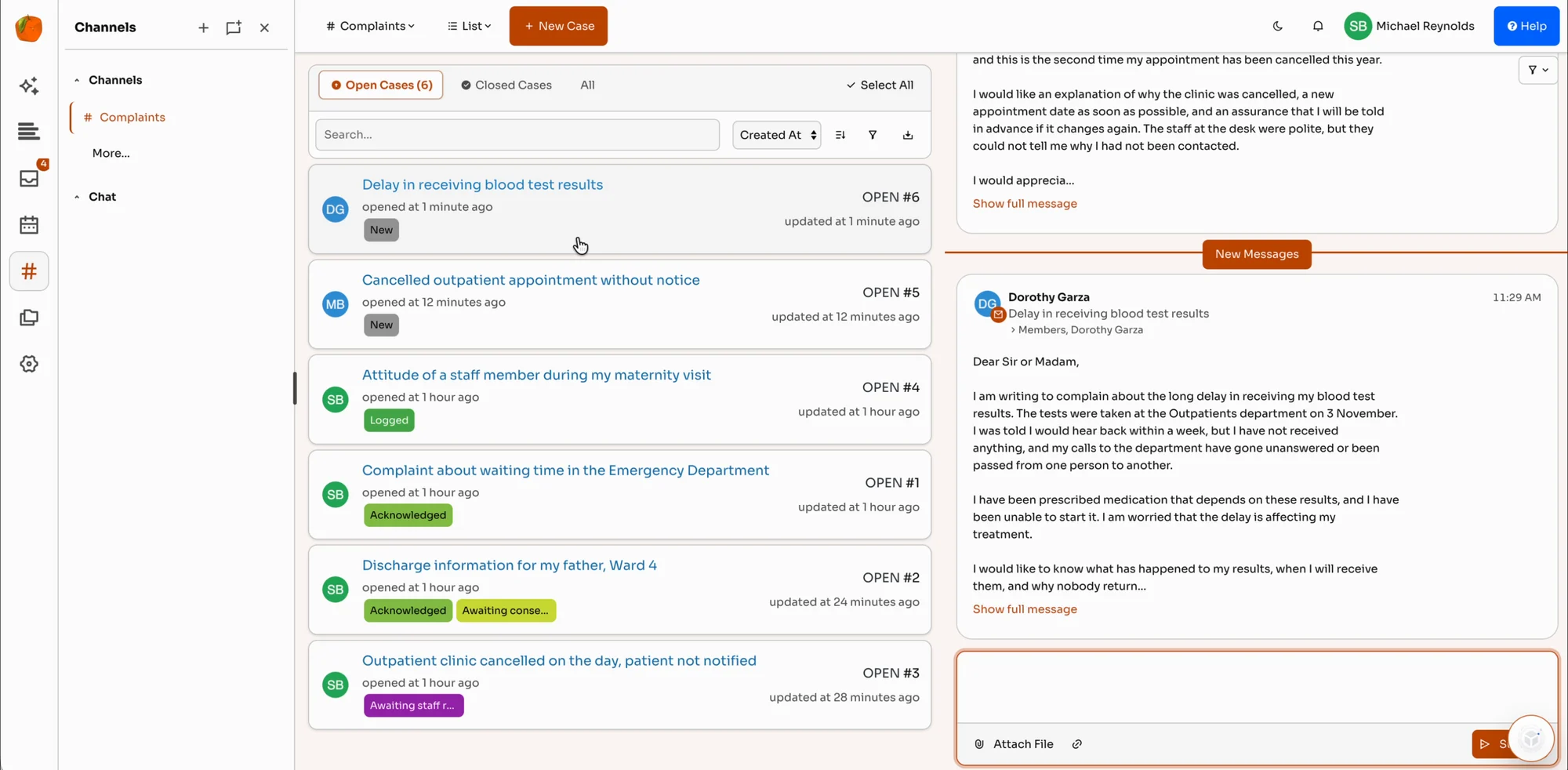
The first task is "Log and validate". The complaints officer checks what was captured from the email and completes the classification:
Case types, sources, wards, governance groups and themes are held as reference data rather than built into the forms, so the lists can be kept up to date without changing the process. A complaint that needs no investigation can be closed at this step, with the reason recorded.
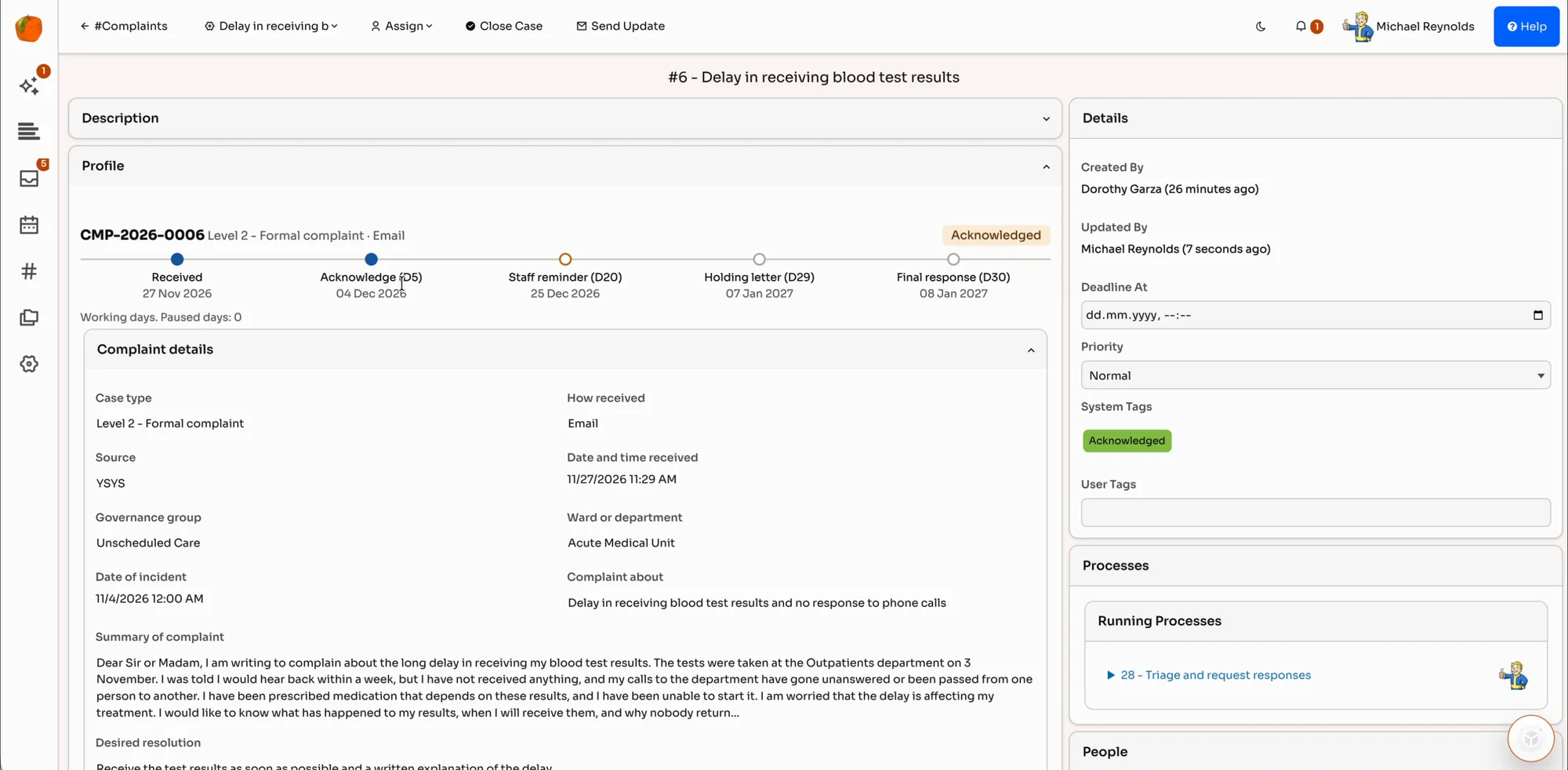
Deadlines are calculated in working days from Emakin's working calendar, which excludes weekends and the public holidays defined in it. Each case type has its own timeframes, also held as reference data. For a Level 2 formal complaint, the demo uses:
The dates are shown as a timeline at the top of every case, and each milestone changes state as the case moves on: done, current, upcoming or overdue.
Some cases cannot progress until the complainant gives consent, for example when they are complaining on behalf of someone else. In that case the consent request goes out with the acknowledgement and the response clock pauses until consent is recorded. The acknowledgement deadline never moves, but the later deadlines move on by the number of paused working days, and the paused days are shown on the case.
If the final response date passes, the case is marked as overdue and the next update to the complainant becomes due at a fixed interval, every 20 working days in the demo, until the complaint is closed. Case status and consent status are also shown as tags, so overdue cases and cases awaiting consent stand out in the case list.
After the complaint is logged, the acknowledgement letter is generated from a template with the complainant's name, the case reference and the date the full response is due. The handler checks it, edits it if needed and sends it. The letter goes out from the case in the handler's name, and replies from the complainant come back onto the same case. Further messages to the complainant, such as a holding letter, can be sent from the case in the same way, so the full exchange stays in one record instead of in individual mailboxes.
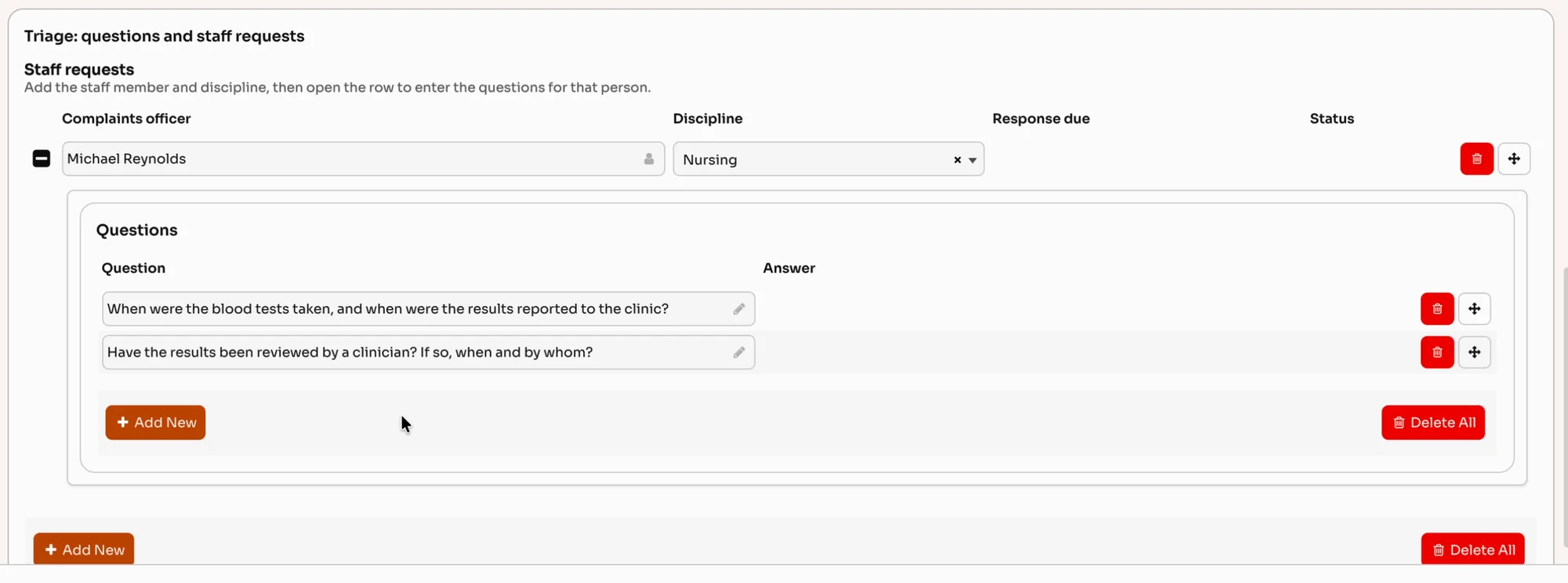
At triage, the handler adds a row for each staff member who needs to respond, with their discipline, and writes the questions that person needs to answer. When the requests are sent, each person gets a "Respond to complaint" task in their own work list. The task shows the complaint summary, the ward, the incident date and their questions. The due date is set from the case's own working-day clock, not typed in by hand.
Each staff request runs as its own sub-process in Emakin's workflow automation engine, in parallel with the others. When an answer comes back, the handler checks it and either accepts it or returns it to the staff member for more detail. The status of every request, sent or responded, is kept on the case, so the handler can see at a glance which answers are still outstanding.
When all requests are answered, the "Review and draft final response" task opens for the handler. All staff answers are shown on one screen, question by question, next to the original complaint. The handler records the outcome and drafts the final response letter on the same screen.
The draft then goes to the approver, who either approves it or returns it to the handler with a comment. A returned draft goes back to the handler for changes and comes back for approval again. After approval, the "Send and close" task sends the letter and completes the closure checklist. The closing date is recorded and the case is marked as closed on time or late against its response deadline.
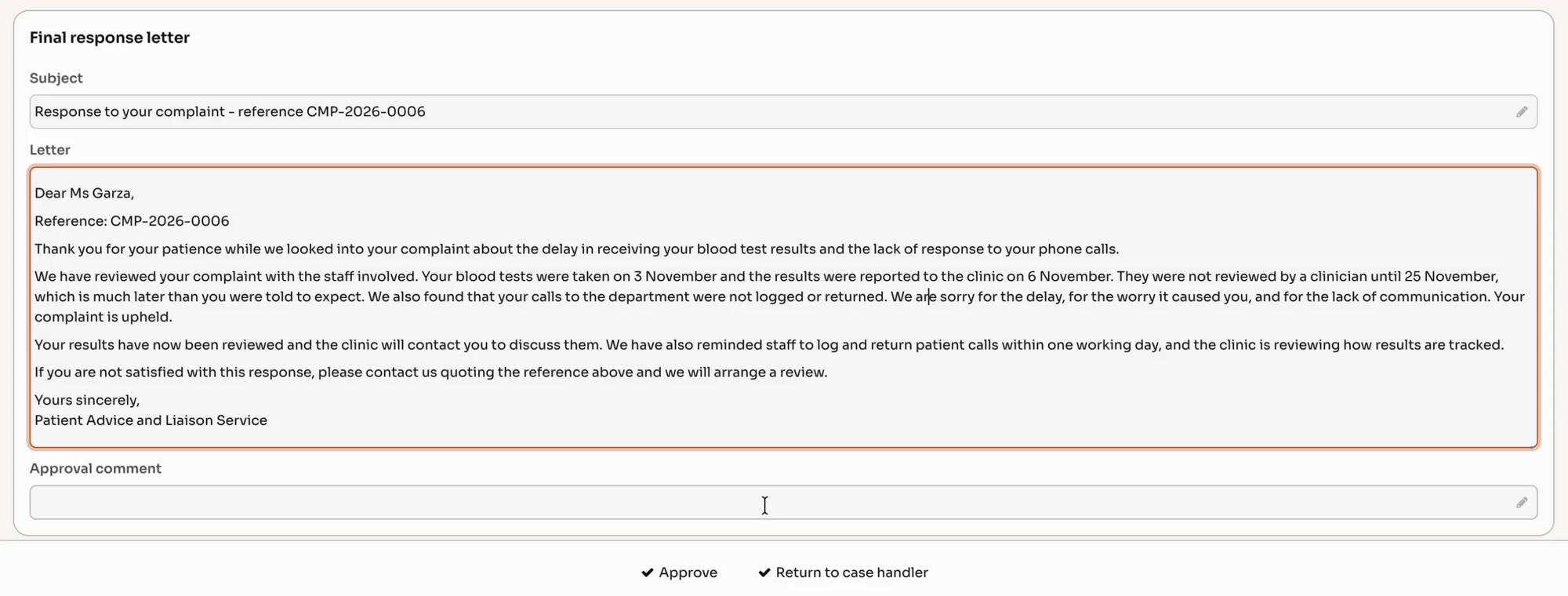
Before drafting the response, the handler records:
Because these are selected from the same lists on every case, they can be compared across wards, governance groups and time periods. Each step of the case, from logging to closure, is also written to the case history with the date and the person who completed it, which gives an audit trail of what was done and when.
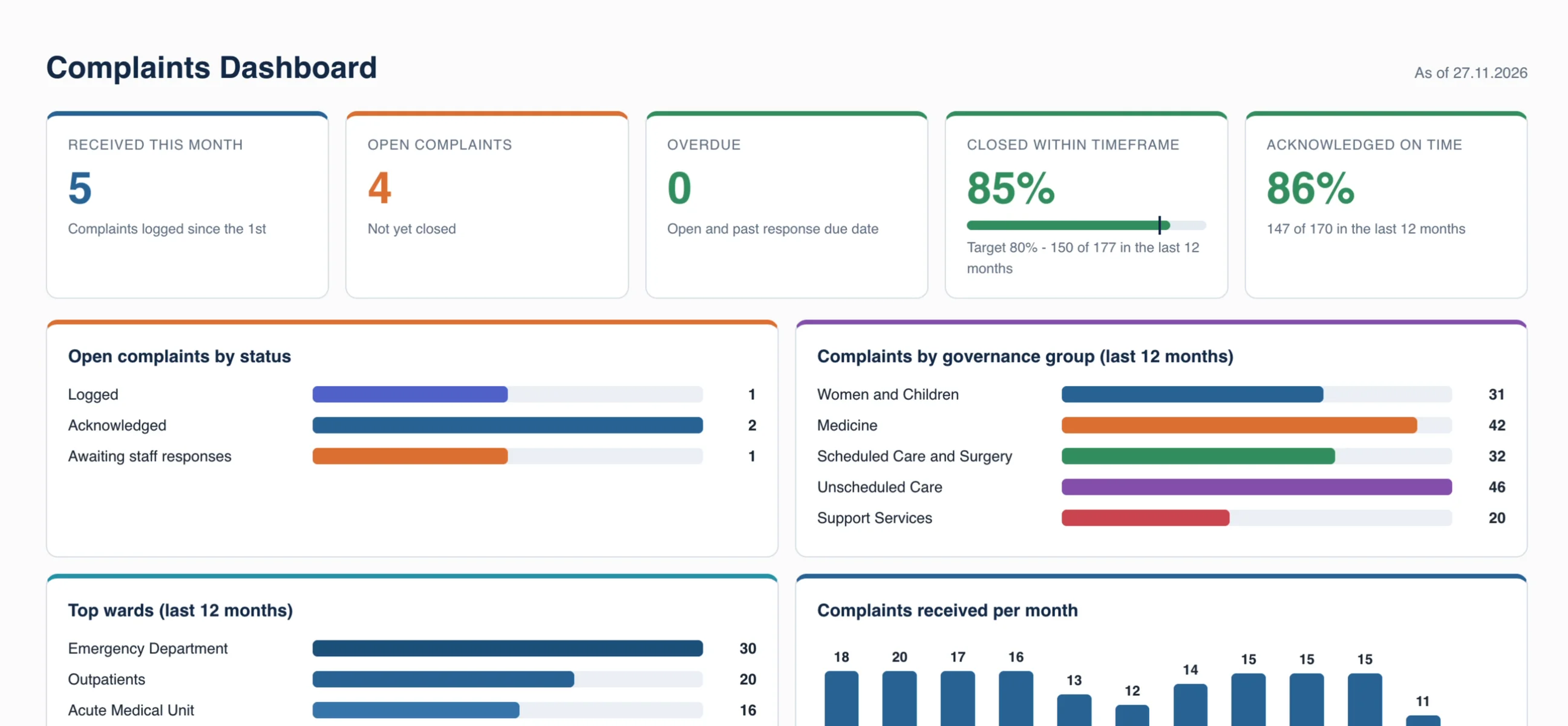
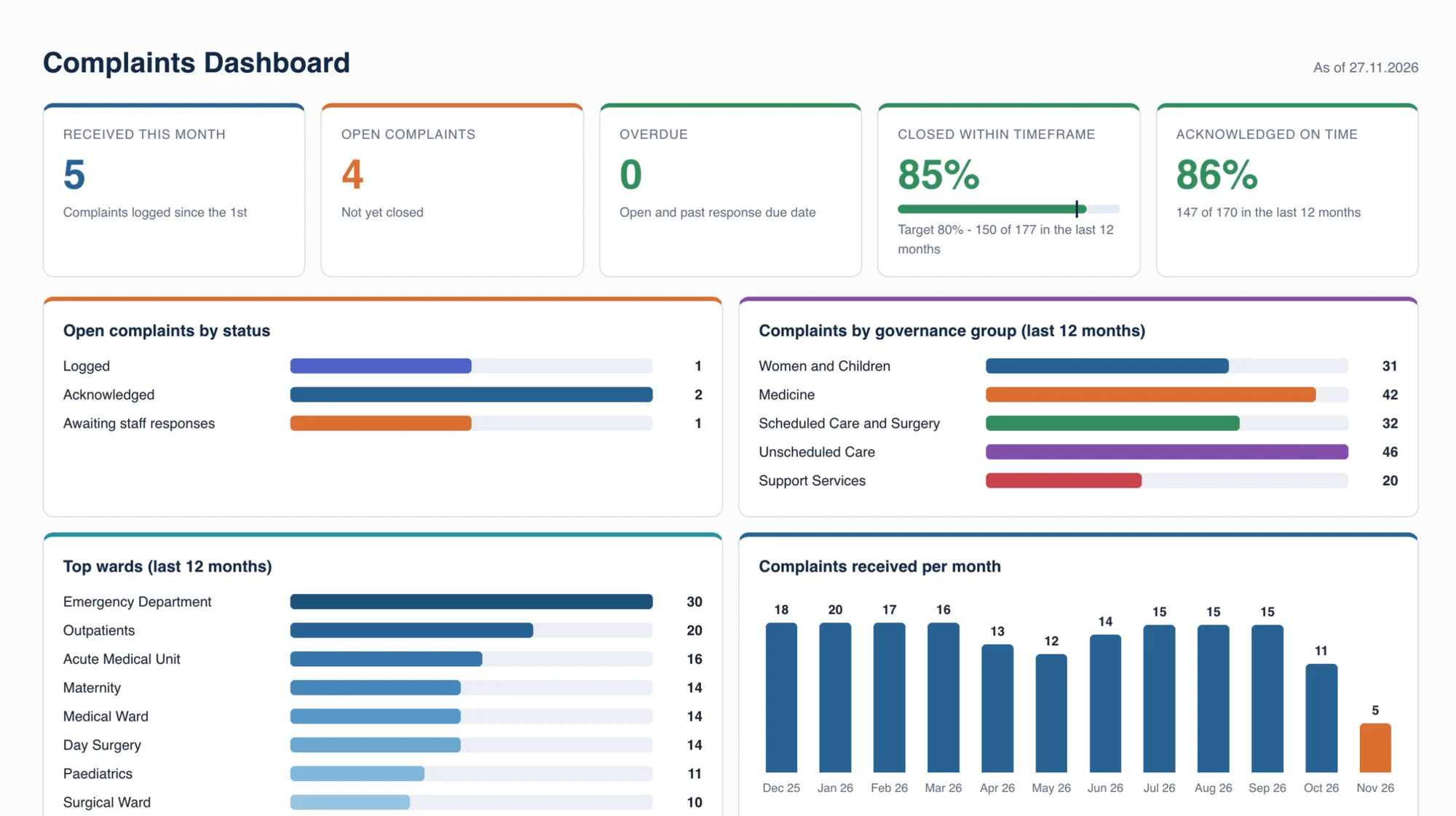
Every time a case changes, its key data is written to a reporting table with one row per complaint: classification, dates, deadlines, paused days, flags, themes, outcome and whether it was closed within the timeframe. The dashboard reads from this table, so there is no separate report to compile.
The top row shows complaints received this month, open complaints, overdue complaints, the share closed within the timeframe against a target, and the share acknowledged on time. Below that are open complaints by status, governance group and ward, a monthly trend, closed complaints by outcome and theme, and a list of open complaints ranked by response due date. The same table can also feed other reports, such as periodic returns to regulators.
Staff sign in with Microsoft Entra ID single sign-on, and tasks are assigned through the organisation structure defined in Emakin, so the right people see the right cases. More on how the platform handles security is on the security and compliance page. Emakin runs on-premises on the organisation's own infrastructure or in the cloud, depending on its hosting policy; see deployment options.
The process, forms, rules, letter templates, working calendar and timeframes are all set up in Emakin's low-code designer and reference data. When the complaints policy changes, for example a new timeframe for a case level, an extra question at triage or a new theme for reporting, the change is made there rather than through a development project.
A complaints management system has to bring every complaint into one place, keep working-day deadlines visible, collect staff input in a structured way, put each response through approval and report from the data it already holds. On Emakin, each of these is configured rather than coded, so the process can follow the organisation's own policy and change with it.
For an overview of the solution, its roles and typical extensions, see the Complaints Management page.
For an example of Emakin in the Irish public sector, read the OPW success story, or visit emakin.com.
Fits your complaints policy, not the other way round.
Insights on process automation, product updates, and what's happening at Emakin
Süreç yönetimi, ürün geliştirmeleri ve Emakin'deki güncel gelişmeler

Emakin is a low-code platform that helps businesses quickly design, automate, and manage their business processes effortlessly.




Emakin, kurumların iş süreçlerini daha hızlı, kontrollü ve verimli şekilde yönetmesine olanak tanıyan bir low-code BPM platformudur.